
Welcome to this online demonstration of...
AcuBase
Standard 2.003!
Details About The Herbs Database The Herbs portion of AcuBase Standard
2.003 contains information on over 300 of the most commonly prescribed
herbs in Chinese medicine. Consistent with the other parts of the database,
information on herbs may be viewed as part of a list, or as individual
herbs, and all herb information may be edited or found by indication
or any other field. Herbs may also be printed out on index cards, or
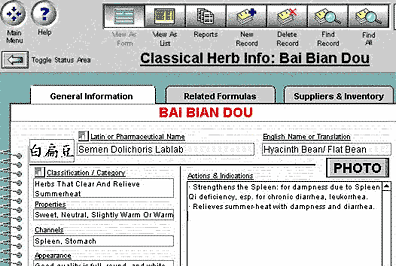
as longer reports. Most herbs also have pictures associated with them,
as well as Chinese characters. The herbs portion is also very relational!
For every herb, you will instantly see all of the formulas (both standard
and patent) related to it, each of which may be viewed with the click
of a mouse. Another tab on the herbs screen shows all of the vendors
in the database that carry each herb, and how much, if any, of that
herb that you have in stock. If you wish to change your inventory details
for a given herb, do it with a single click! And, as with all of AcuBase, any portion
of the database may be edited to your shen's content! Like all of the other databases in AcuBase,
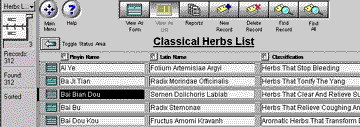
the herbs portion of the program starts with a list of all of the herbs
in the database... To see more details about a given herb,
one may easily switch to Form View by simply pressing a button located
next to the name of the herb, or by clicking on the "View As Form"
button at the top of the screen... Graphic illustrations
of the following features (be patient, this page till take a while to
load...) You may print acupoint information as
long reports, or on index cards, as in the example below...
Back software
page acupuncture site
AcuBase
Demo
->Acupoints
->Herbs
->Formulas
->Patents
->Review Questions
Back software pagealternative
health care site 
 Back
BackNext
