
Welcome
to this online demonstration of...
AcuBase
Standard 2.003!
The
Patents & Vendors Databases The Patent
Formulas database is another exciting addition to the original AcuBase
program. We have included over 500 patent formulas and their associated
formula and vendor information from the top vendors in the field. The Patent
Formulas database is unique in several ways. First, all data from the
Patent Formulas database was submitted for inclusion in AcuBase Standard
2.003 by the creators and/or chief distributors of the formulas. At
the time of this writing, those vendors include: K'an Herbs, Health
Concerns, East West Herbs, Lotus Herbs, Golden Flower Chinese Herbs,
Mayway (Plum Flower and Min Shan), Chinese Modular Solutions, Spring
Wind Herbs, Tashi Enterprises (Min Tong), and the Institute
for Traditional Chinese Medicine and Preventive Health. Because
the formulas in the Patent Formulas database were developed by their
associated vendors, and because their related written materials are
copyright protected, AcuBase Standard 2.003 does not offer any patent
formula-related reports. You may, however, modify as much information
as you would like to in the Patent Formulas database Finally,
unlike standard herbs and formulas, each of which may have several vendors,
each of the patent formulas has only one vendor associated with it.
This vendor's name may be seen in both Form View and List View. From
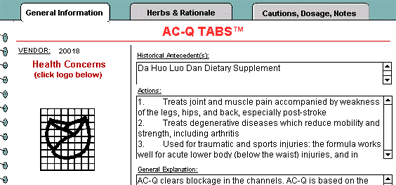
Form View's General Information tab, the left side of the screen shows
the vendor name and logo(s), and, just below the logo(s), the amount
of the patent formula in stock in the Inventory database. Like all
of the other parts of AcuBase, the patents database opens to show you
all of the patent formulas in the database. These may be sorted by formula
name or vendor. To see more details about a given formula, one may easily
switch to Form View by simply pressing a button located next to the
name of the formula, or by clicking on the "View As Form"
button at the top of the screen. The main portion of the "Form
View" screen appears below To get
more information on a given vendor, simply click on that vendor's logo
or on the "Go To Vendor" button (at the top of each screen).
To add or modify a given patent formula in the Inventory database, you
may also click on the "Add To Inventory" button on the top
of the General Information tab screen. And, of course, you may perform
a "find" from any part of the database, so if you want to
find all patent formulas in the database for a given condition, it's
just a click away! Back
software page acupuncture site
AcuBase
Demo
->Acupoints
->Herbs
->Formulas
->Patents & Vendors
->Review Questions
Graphic illustrations of the following features
(this page will take a while to load...)
As stated
above, if you were to click on the logo associated with the vendor
of a given patent formula (or the "Go To Vendor" button),
you would get further information on that vendor. Using Lotus Herbs
as an example, you would first see the following screen, showing general
contact information related to Lotus...
Back software pagealternative
health care site 
 Back
BackNext
