
Welcome to this
online demonstration of...
AcuBase
Standard 2.003!
Details
About The Formulas Database The Standard
Formulas database within AcuBase Standard 2.003 contains information
on the most commonly prescribed formulas in Chinese medicine. Consistent
with the other parts of the database, information on formulas may be
viewed as part of a list, or as individual fomrulas, and all formula
information may be edited or found by indication or any other field.
Formulas may also be printed out on index cards, as longer reports,
or even in a format which includes only the names of the herbs in Chinese
and pinyin, along with dosages (so that you can make your own formulas
and have prescriptions filled at an herbal pharmacy). Like the
other databases in AcuBase, the Formulas portion is also very relational!
For every formula, you will instantly see all of the herbs related to
it, each of which may be viewed individually with the click of a mouse.
If you wish to add herbs to a formula, and/or create your own formulas,
adding herbs is as easy as point and click! Simply click on the herb
field to see an alphabetical pop-up list (by pinyin name) of all herbs.
Click on the one you want to add, and its latin name and Chinese characters
are added automatically! Another
tab on the formulas screen shows all of the vendors in the database
that carry each formula, and how much, if any, of that formula that
you have in stock. If you wish to change your inventory details for
a given formula, do it with a single click! And, as
with all of AcuBase, any portion of the database may be edited to an
almost unlimited extent! Like all
of the other databases in AcuBase, the formulas portion of the program
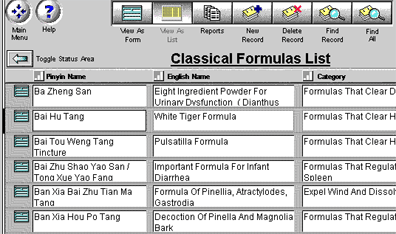
starts with a list of all of the formulas in the database... Graphic
illustrations of the following features (be patient, this page will
take a while to load...)
Back
software page acupuncture site
AcuBase
Demo
->Acupoints
->Herbs
->Formulas
->Patents
->Review Questions
Back software pagealternative
health care site 
 Back
BackNext
