
Welcome to this online demonstration of...
AcuBase Standard 2.003!
|
|
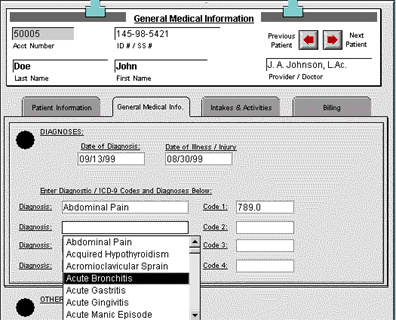
Patient Medical Information The function of the second tab, General Medical Info., is self-explanatory. Here you may enter the date of your initial diagnosis of this patient, the date of illness / injury (especially important for U.S. worker's compensation cases), and up to four diagnoses, with their related codes. These diagnoses are linked to the AcuBase Main Menu's Diagnosis Preferences.
Upon clicking in any of the four Diagnosis fields, you will see an alphabetical pop-up list of all available diagnoses from your Diagnosis Preferences list. Simply scroll down to the appropriate diagnosis and click on it to automatically enter it and its related code. If the diagnosis you want is not on the list, you may double-click on the diagnosis field and put in your new diagnosis and code manually. Then, from that point forward, the new diagnosis will appear in the pop-up list (assuming you also gave it a unique code). Note that all codes provided with AcuBase Standard 2.003 are U.S. ICD-9 codes. The General Medical Info. Tab also has a large memo field ("Other Medical Information") where you may enter a virtually unlimited amount of related patient medical information. (This field is behind the bottom of the pop-up list in the example above.) |
||
|

 Back
Back