
Welcome to this online demonstration of...
AcuBase
Standard 2.003!
Reports in AcuBase No billing database is complete without
some elementary reports which allow you to get a better idea of the
amounts that you have billed and collected, as well as statements for
each patient. AcuBase Standard 2.003 not only provides these reports,
but also gives you the ability to print out a "Phone Book"
of all or some of your patients; allows you to print labels; and may
even assist you in printing envelopes. To run a report, you would start by clicking
on the Reports button from anywhere within the Patient Information &
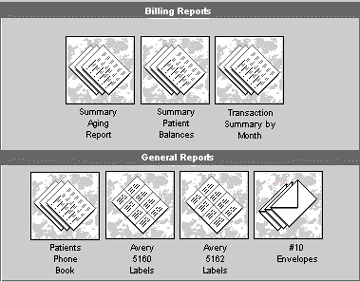
Billing database. The reports window looks like this: For any of the above reports, simply
click on the report that you would like to create. Summary Aging Report
The Summary Aging Report shows all outstanding
invoices, and groups them by aging categories of 120+ days, 90-120 days,
60-90 days, 30-60 days, and 0-30 days from the date the report is run.
To run this report, click on the "Summary
Aging Report" button from the Reports screen. You will be given
the option to change the default name of the report (which appears on
top of the report), and then you will be given a "print preview,"
after which the report will print. Summary Patient Balances The Summary Patient Balances report groups
all invoices (outstanding and paid in full) by patient (last name first).
You may also select some or all patients and/or use this report to print
a statement, if you wish. To run this report, click on the "Summary
Patient Balances" button from the Reports screen. You will be given
the option to change the default name of the report (which appears on
top of the report), and then you will be taken to a "Find"
screen. At the find screen, enter the criteria you would like to use
to find the appropriate patients to report on and click on the "Find"
button. To print a statement for a given
patient, change the default
name of the report to "Statement for (Patient Name)" or to
whatever else you want to call it, and then do a find for that patient
alone. Transaction Summary By Month The Summary Patient Balances report groups
all invoices (outstanding and paid in full) by the months of the year.
To run this report, click on the "Transaction
Summary By Month" button from the Reports screen. You will be given
the option to change the default name of the report (which appears on
top of the report), and then you will be taken to a "Find"
screen. At the find screen, enter the criteria you would like to use
to find the appropriate data to report on and click on the "Find"
button. After clicking the "Find" button,
you will be given a "print preview," after which the report
will print. General Reports The General Reports consist of a personalized
phone book, Avery labels, or Envelopes related to the patients
in your Patient Information database. To create any one of these reports,
you must first find and sort the records that you want in your report.
Once you have found and sorted the records you would like to include,
you will be able to preview and/or print that report.
AcuBase
Demo
 Home
Home Back
BackNext
